

Crypto algorithmic trading has gained massive traction, and API access is the first step towards automated strategies. If you’re a CoinDCX user looking to run your own trading bot or integrate with platforms like NextLevelBot, this guide explains how to generate API keys for algo trading securely at CoinDCX.
Note: Always keep your API keys confidential and avoid sharing them publicly.
What is an API Key?
An API (Application Programming Interface) key allows external applications, like trading bots or custom dashboards to communicate with your CoinDCX account. With the correct permissions, you can:
- View balances
- Place or cancel trades
- Monitor order history
- Automate trading strategies
Step-by-Step Guide to Create API Key for Algorithmic Trading on CoinDCX
Prefer visual help? Watch this official walkthrough on YouTube to follow the process step-by-step.
Step 1: Access the API Dashboard
- Log in to the CoinDCX website.
- Navigate to Profile → API Dashboard.
- Complete any required authentication.
Step 2: Delete the existing API key
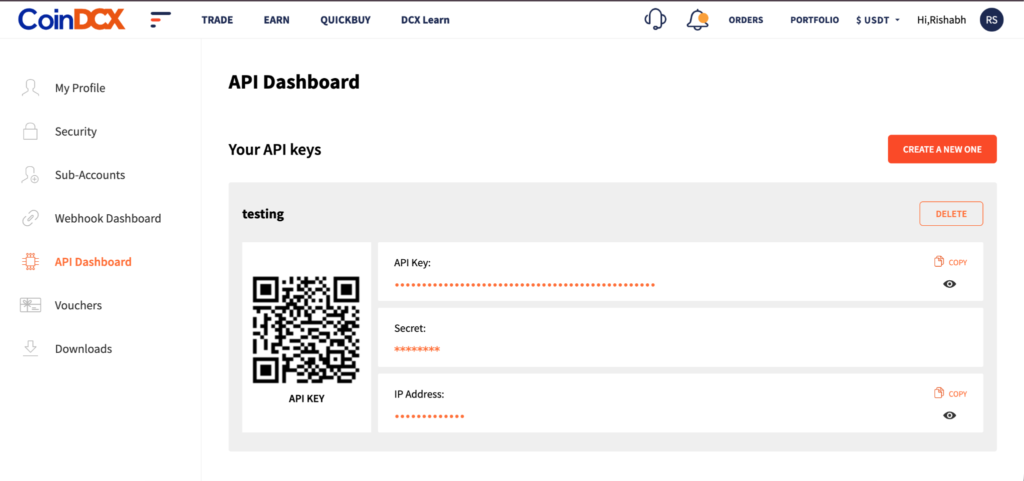
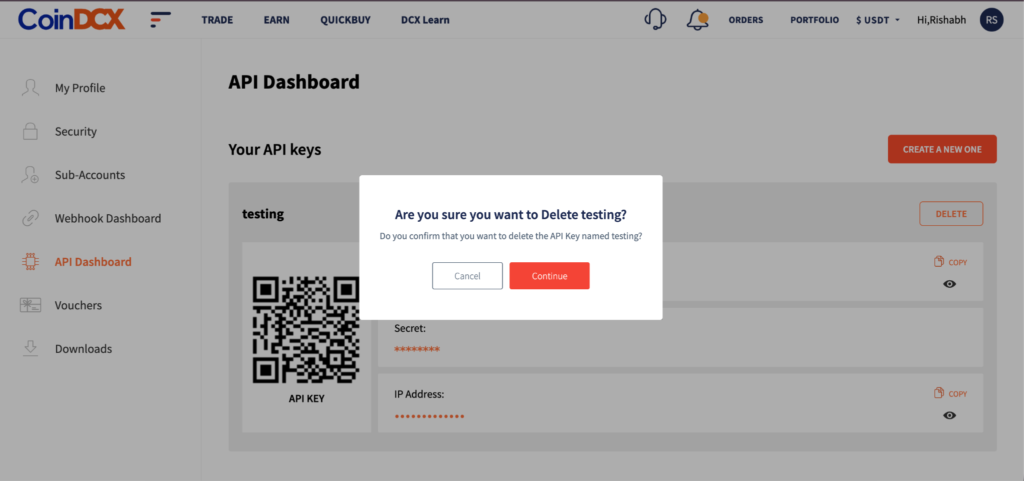
- Open the API key you need to replace.
- Click Delete.
- Confirm the deletion by entering your account password.
Step 3: Generate a new API key
- Return to the API Dashboard.
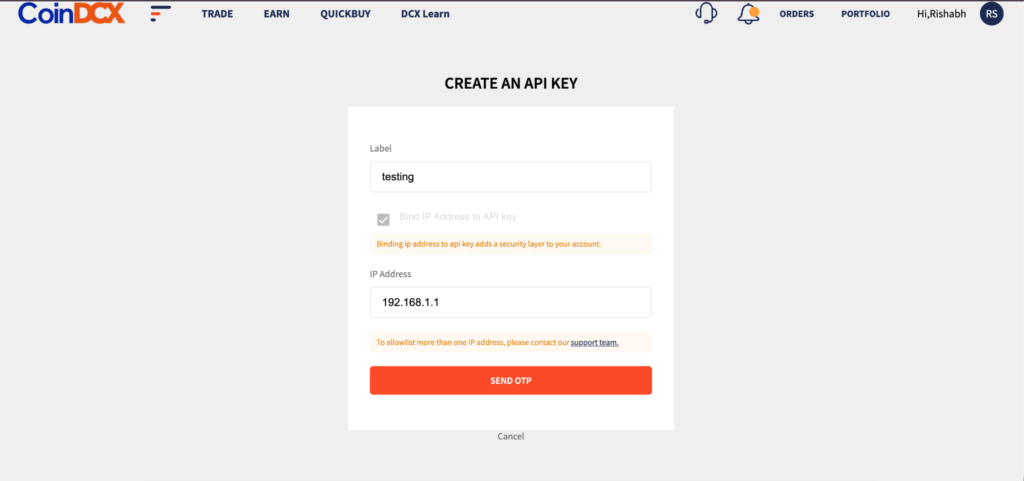
- Click Create A New One.
- Enter a label for your new API key.
- Bind the IP address from which your application or server will access the API. This step is mandatory.
- Request and enter the OTPs sent to your registered email address and mobile number.
- Click Create.
Step 4: Save your credentials and update connected services
- Copy and securely store your newly generated API Key and API Secret.
- Replace the previous credentials in your trading bots, applications and integrations.
- Verify that each connected service is functioning with the new credentials.
Important: Your API Secret is displayed only during creation. It cannot be retrieved again after you leave the page. Store it securely before navigating away.
Platform IP addresses for reference
Find your platform in the table below and confirm the applicable IP address with your provider before creating your new API key. Enter only the addresses required for your own integration.
| Platform | IP address |
| TradO | 13.205.79.240 |
| Stratz | 13.232.143.37 |
| Valuetix | 108.181.252.87 |
| Tradetron | 103.216.94.212 |
| Nextlevel Bot | 65.0.51.141 |
| Nextlevel Bot | 15.207.214.51 |
| CryptoChartAnalysis | 89.116.21.33 |
| XALGOS | 103.118.182.84 |
| Vodoo | 3.7.97.106 |
| Automate Algos | 13.201.75.220 |
If your platform is not listed, contact its support team for the IP address used to send API requests to CoinDCX. For a self-hosted application, confirm your server’s outbound public IP address.
Both API key regeneration and IP binding are mandatory. Complete the replacement and update all connected services to continue using CoinDCX APIs after existing keys are deprecated.
Best Practices for API Key Safety
Following are the best practices for API key usage in algo trading at CoinDCX
- Enable 2FA on your CoinDCX account
- Whitelist IP addresses used by your trading bot
- Use read-only access when testing
- Never share your secret key with others
- Avoid using public Wi-Fi to manage your API
Common Use Cases for API Keys
- Portfolio tracking tools
- TradingView webhook integration
- Custom dashboards or analytics setups
Wrapping Up
CoinDCX is one of the best crypto algo trading platforms to generate API keys and integrate with your preferred algo trading tools. Whether you’re a pro or just dabbling with crypto algo trading bots, this feature unlocks the potential to automate and scale up your trading strategy.
Always follow security best practices and never expose your API secret publicly.
Frequently Asked Questions
Q1. Can I regenerate my CoinDCX API key if I lose the secret?
Yes, but you’ll need to revoke the old key and generate a new pair.
Q2. Is there a rate limit for API requests?
Yes, refer to the CoinDCX API documentation for current rate limits.
Q3. Can I create multiple API keys?
Yes, depending on your use case, you can generate multiple keys with different permissions.
Q4. Can I delete my API key?
Yes, you can delete an API Key by navigating to the API Dashboard. First, Click DELETE in the top right corner. A confirmation dialogue box will appear. Click Continue. A new dialogue box will appear. Enter your account password and click Confirm. Your API key will be deleted.
Q5. Is API key regeneration mandatory on CoinDCX?
Yes. You need to regenerate your API keys to keep using CoinDCX APIs. Existing keys will be deprecated, so complete the replacement before then.
Q6. Is IP binding mandatory for CoinDCX API keys?
Yes. Every new API key must be bound to an IP address. Add the IPs your apps or bots trade from when you generate the key.
Q7. What happens to my existing API keys?
Existing keys will be deprecated and will stop working. Replace them with new keys, bound to your IPs, before the cut-off date.
Disclaimer:
The information/views provided are for informational and educational purposes only and do not constitute investment, financial, legal, or other professional advice. Nothing herein constitutes an offer to invest, or to buy/sell assets, or to participate in any investment or trading strategy. No representation, express or implied, is made as to accuracy. We do not own or control any third-party platforms or exchanges you may use, and accessing them is entirely at your own risk. We disclaim liability for their performance, security, or compliance.
Dealing in virtual digital assets (VDAs), including crypto assets or tokens, involves significant risks, such as price volatility, security vulnerabilities, and potential regulatory changes in India. Investments may lead to partial or complete loss of value. No assurance is given that any algorithmic trading strategy will generate profits or avoid losses. We disclaim any liability for any reliance placed on the information provided. You should carefully review all relevant information, conduct due diligence, and/or seek independent professional advice before making any decisions.