


As part of our ongoing security measures, CoinDCX requires users with existing API keys to delete them and generate new credentials. Existing API keys will be deprecated, and IP binding is now mandatory when creating new API keys.
If you use API keys to connect your CoinDCX account to a trading bot, external application or automated trading platform, you must also update that service with your new API Key and API Secret.
Why do you need to regenerate your API keys?
API key regeneration is a mandatory security measure intended to reduce the risks associated with continued use of existing credentials.
Once your existing API key is deleted or deprecated, applications using it will no longer be able to authenticate with CoinDCX. To continue using these integrations, you must:
- Delete your existing API key.
- Create a new API key and secret with mandatory IP binding.
- Update your connected applications with the new credentials and verify connectivity.
IP binding is now mandatory
IP binding restricts the use of your API key to requests originating from the IP addresses specified during creation. Requests from other IP addresses will be rejected.
Previously optional, IP binding is now required within the API key creation interface. This provides an additional layer of protection by restricting where your API credentials can be used.
Enter the IP address used by the application or server making API requests to CoinDCX. If your bot runs on a third-party platform, confirm the required IP address with that provider before proceeding.
How to regenerate your CoinDCX API keys
CoinDCX does not have a separate regeneration flow. You need to delete your existing API key and create a new one with mandatory IP binding.
Before you begin: Have the correct IP address for your trading application or server ready. Deleting an existing key will prevent connected applications from authenticating with it until you update them with new credentials.
Step 1: Access the API Dashboard
- Log in to the CoinDCX website.
- Navigate to Profile → API Dashboard.
- Complete any required authentication.
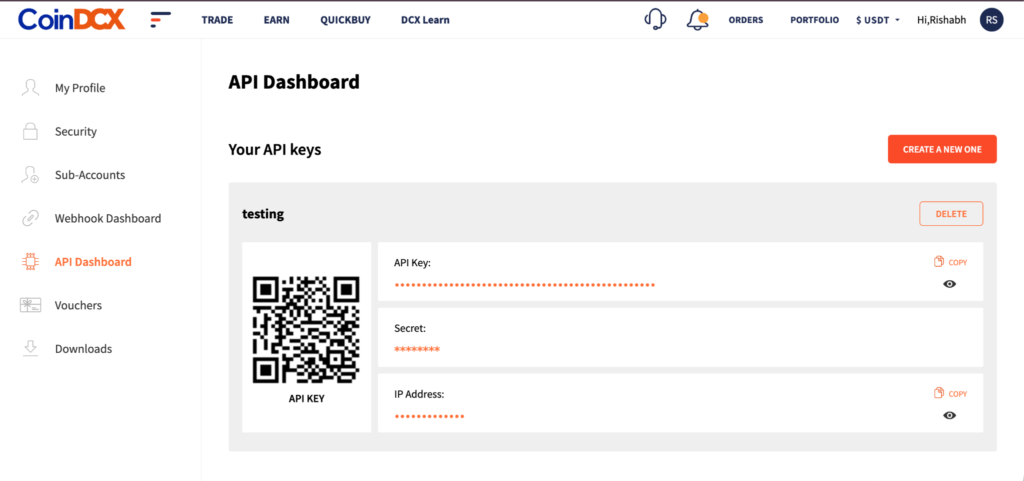
Step 2: Delete the existing API key
- Open the API key you need to replace.
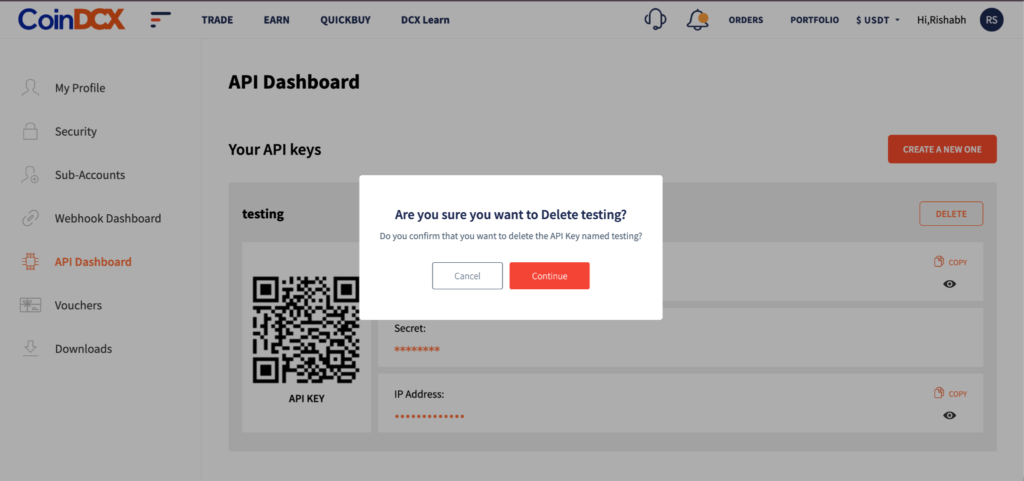
- Click Delete.
- Confirm the deletion by entering your account password.
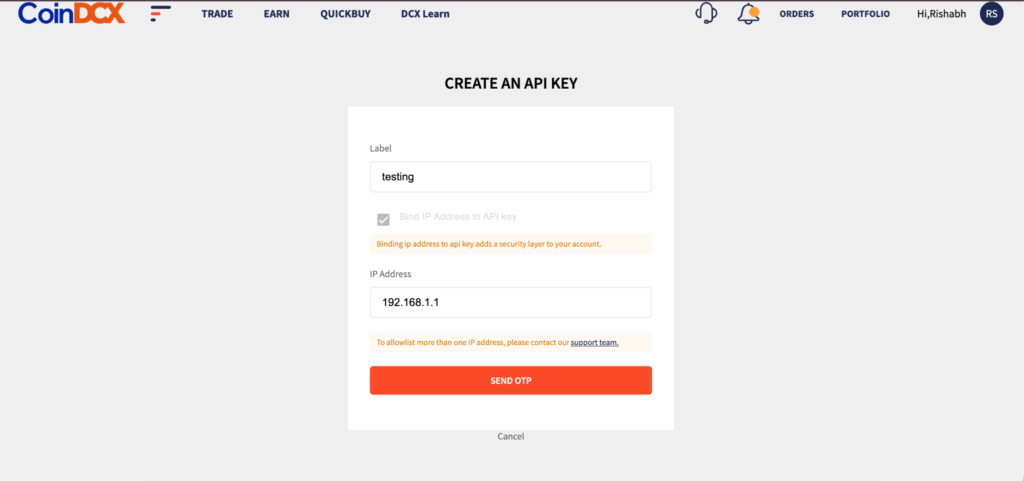
Step 3: Generate a new API key
- Return to the API Dashboard.
- Click Create A New One.
- Enter a label for your new API key.
- Bind the IP address from which your application or server will access the API. This step is mandatory.
- Request and enter the OTPs sent to your registered email address and mobile number.
- Click Create.
Step 4: Save your credentials and update connected services
- Copy and securely store your newly generated API Key and API Secret.
- Replace the previous credentials in your trading bots, applications and integrations.
- Verify that each connected service is functioning with the new credentials.
Important: Your API Secret is displayed only during creation. It cannot be retrieved again after you leave the page. Store it securely before navigating away.
Platform IP addresses for reference
Find your platform in the table below and confirm the applicable IP address with your provider before creating your new API key. Enter only the addresses required for your own integration.
| Platform | IP address |
| TradO | 13.205.79.240 |
| Stratz | 13.232.143.37 |
| Valuetix | 108.181.252.87 |
| Tradetron | 103.216.94.212 |
| Nextlevel Bot | 65.0.51.141 |
| Nextlevel Bot | 15.207.214.51 |
| CryptoChartAnalysis | 89.116.21.33 |
| x-algos | 139.59.46.206 |
| Vodoo | 3.7.97.106 |
| Automate Algos | 13.201.75.220 |
If your platform is not listed, contact its support team for the IP address used to send API requests to CoinDCX. For a self-hosted application, confirm your server’s outbound public IP address.
Both API key regeneration and IP binding are mandatory. Complete the replacement and update all connected services to continue using CoinDCX APIs after existing keys are deprecated.