Blog-new-logo-2023Blog-new-logo-2023Blog-new-logo-2023Blog-new-logo-2023
  • CRYPTO NEWS
  • TOPICS
    • Futures Trading
    • Crypto Basics
    • DeFi
    • Metaverse
    • NFT
    • Blockchain
  • CRYPTO VERSE
    • Personal Finance
    • Cryptocurrency
    • Price Predictions
    • Crypto Deep Dives
  • PRODUCT
    • Tutorials
    • Product Features
    • Security
  • COINDCX
    • Announcements
    • Community
    • Crypto Competition
    • Listings
    • Opinion
    • Stories
Visit CoinDCX
✕
            No results See all results

            Blog / Tutorials / Introducing Trade On Charts on CoinDCX Futures

            Introducing Trade On Charts on CoinDCX Futures

            CoinDCX has launched “Trade on Charts”, a powerful new feature…

            15 Oct 2025 | 4 min read

            Table of Contents

            Toggle
            •  Why Trade On Charts?
            • Step-by-Step: How to Use Chart Trading
            • 1. What’s New: Chart Trading Mode
            • 2. Placing a Market Order
            • 3. Managing TP/SL
            • 4. Placing a Limit Order
            • 5. TP/SL – Manual & Editable
            • 6. Chart Settings
            • Quick Recap
            • Conclusion

            CoinDCX has launched “Trade on Charts”, a powerful new feature designed for experienced Futures traders who prefer speed, precision, and visual execution. With Trade on Charts, you can place, edit, and manage Futures orders directly on the chart without switching screens on both Mobile & Web.

            This feature is currently in limited rollout and will be going live for all users soon, bringing a faster and more intuitive trading experience right to your charts.

             Why Trade On Charts?

            • Visual setup for Entries, Take Profit (TP), Stop Loss (SL) & Liquidation Zone.
            • Faster order placement during volatile market moves
            • Easy adjustments by simply dragging order lines on the chart
            • Check Active P&L and Liquidation Zone directly on the chart
            • Customizable chart view for cleaner and distraction-free trading

            Step-by-Step: How to Use Chart Trading

            Here is the step-by-step guide to using chart trading on CoinDCX.

            1. What’s New: Chart Trading Mode

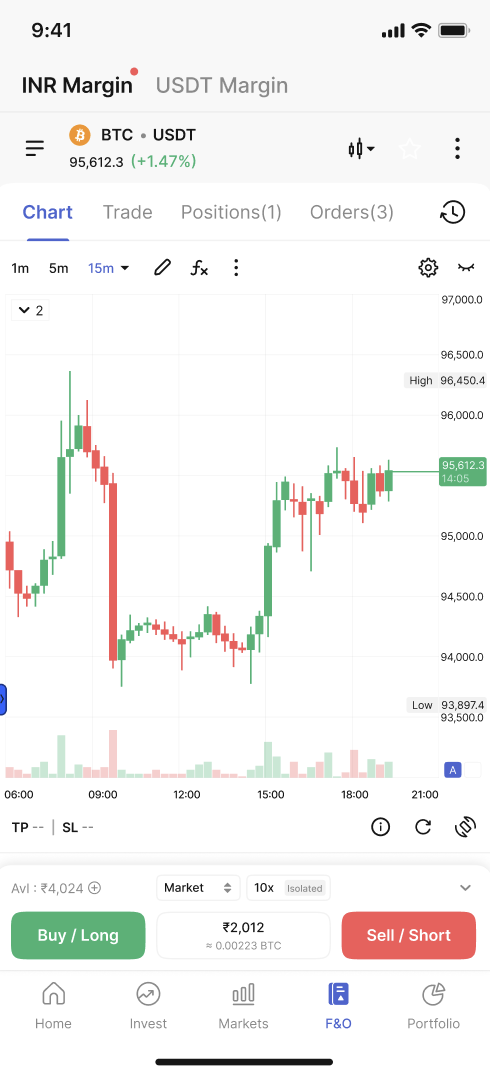
            To deliver a seamless user experience, we’ve introduced Chart Trading Mode.

            • Just head to the Futures page and switch to the Charts section, you can now place orders directly from the chart without going to the Order Form separately.
            • The chart itself acts as your interactive order form, letting you set entries, adjust TP/SL, and manage trades visually.
            • This makes trading faster, easier, and more intuitive, especially for experienced traders who rely on real-time decisions.
            2. Placing a Market Order

            • Open the Order Form from the chart
            • Select Order Type – Market
            • Choose your Leverage
            • Enter Order Size
            • Tap Buy/L or Sell/S

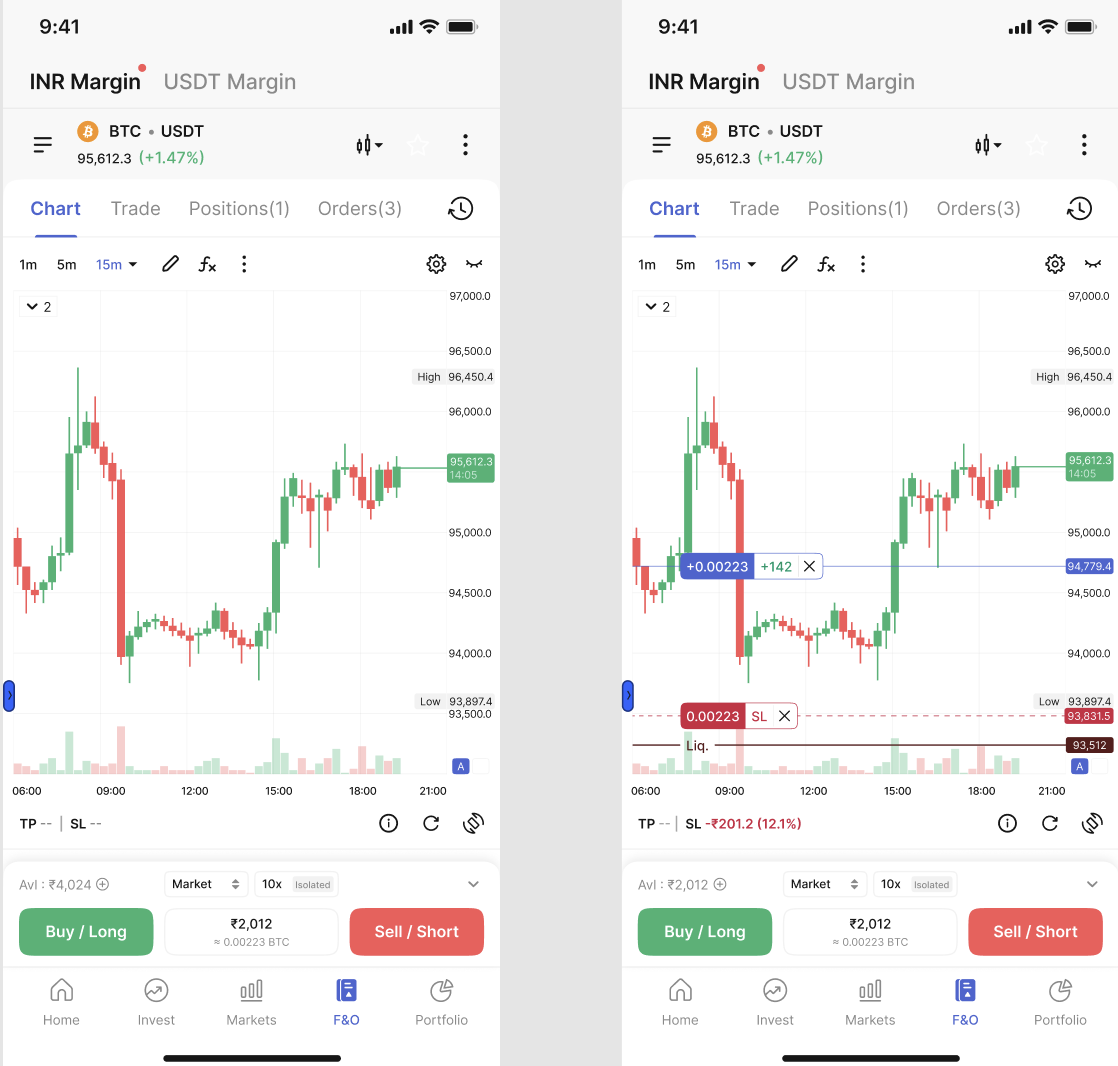
            After placing the order: You’ll now see two key markers on the chart.

            Postion Line:

            • Drawn at your Average Entry Price
            • Displays Contracts + Live P&L
            • Tapping the ‘X’ icon lets you Quick Exit the position instantly

            Liquidation Line:

            • Placed at your Liquidation Price (based on isolated margin settings)
            • Helps you visually track risk as price moves
            3. Managing TP/SL

            • Tap on the lines to see the TP & SL buttons and drag to your desired price point.
            • Tap :x: icon to cancel your order
            • You can also check active positions in the Positions tab to: Adjust size, Add TP/SL, Partially or fully close

            4. Placing a Limit Order

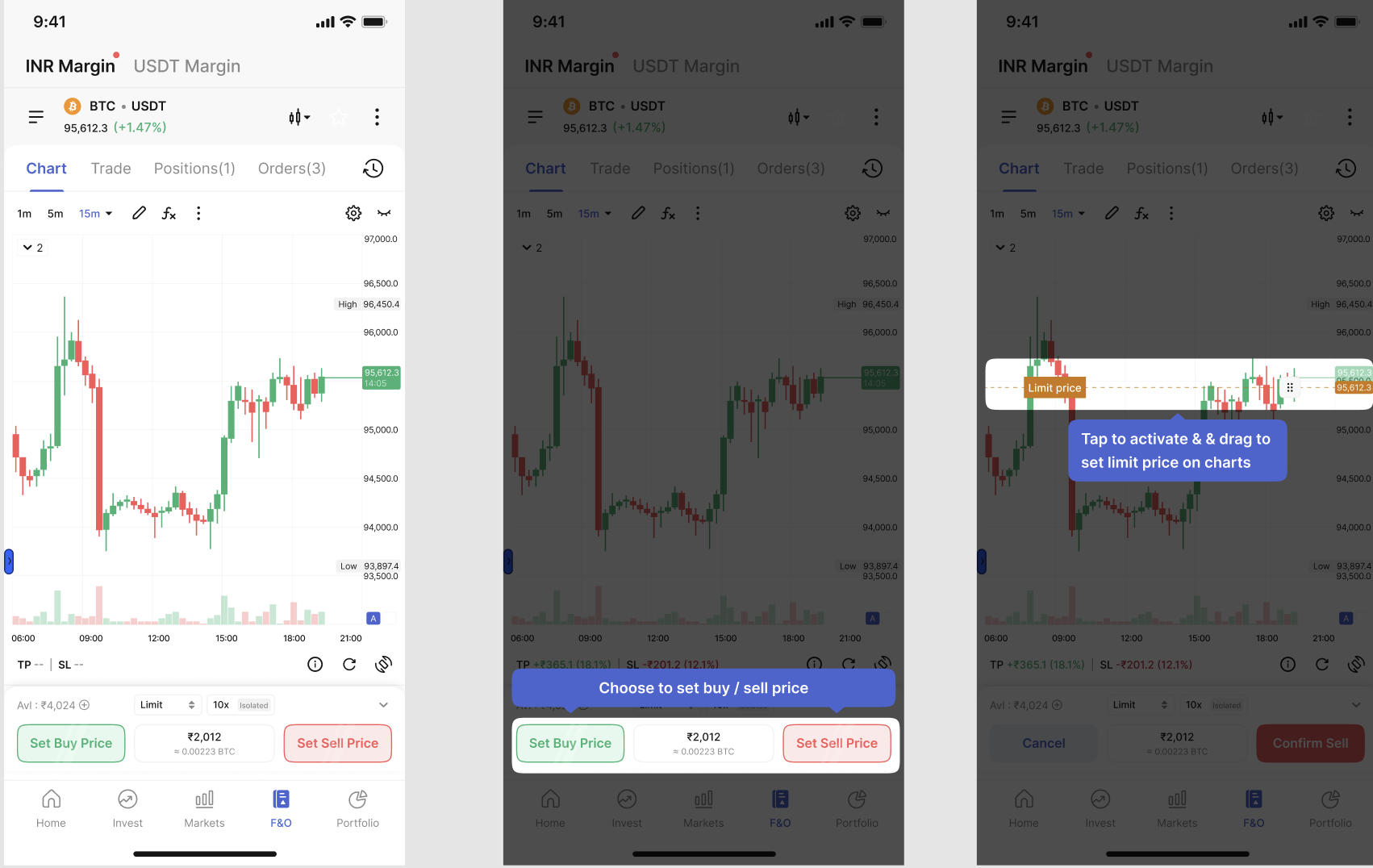
            • Select Limit Order from the order form.
            • Tap Set Buy Price or Set Sell Price a line appears on the chart.
            • Important: click the line first, then drag it.
            • Enter order size and leverage and click Confirm.
            • Edit the drag lines or cancel (×).

            Editing an Existing Limit Order:

            Tap on the Limit Order Line directly on the chart to modify it. The line displays three things:

            • Order Quantity (shows + or – depending on buy/sell side)
            • Order Type (Limit/Trigger)
            • A Cancel (X) icon for instantly removing the order

            Simply drag the limit line to adjust the price or tap to edit size and type.
            5. TP/SL – Manual & Editable

            • Add Take Profit or Stop Loss using the TPSL button right from the chart
            • Quick presets like 10%, 20% are available, or you can enter custom values manually

            6. Chart Settings

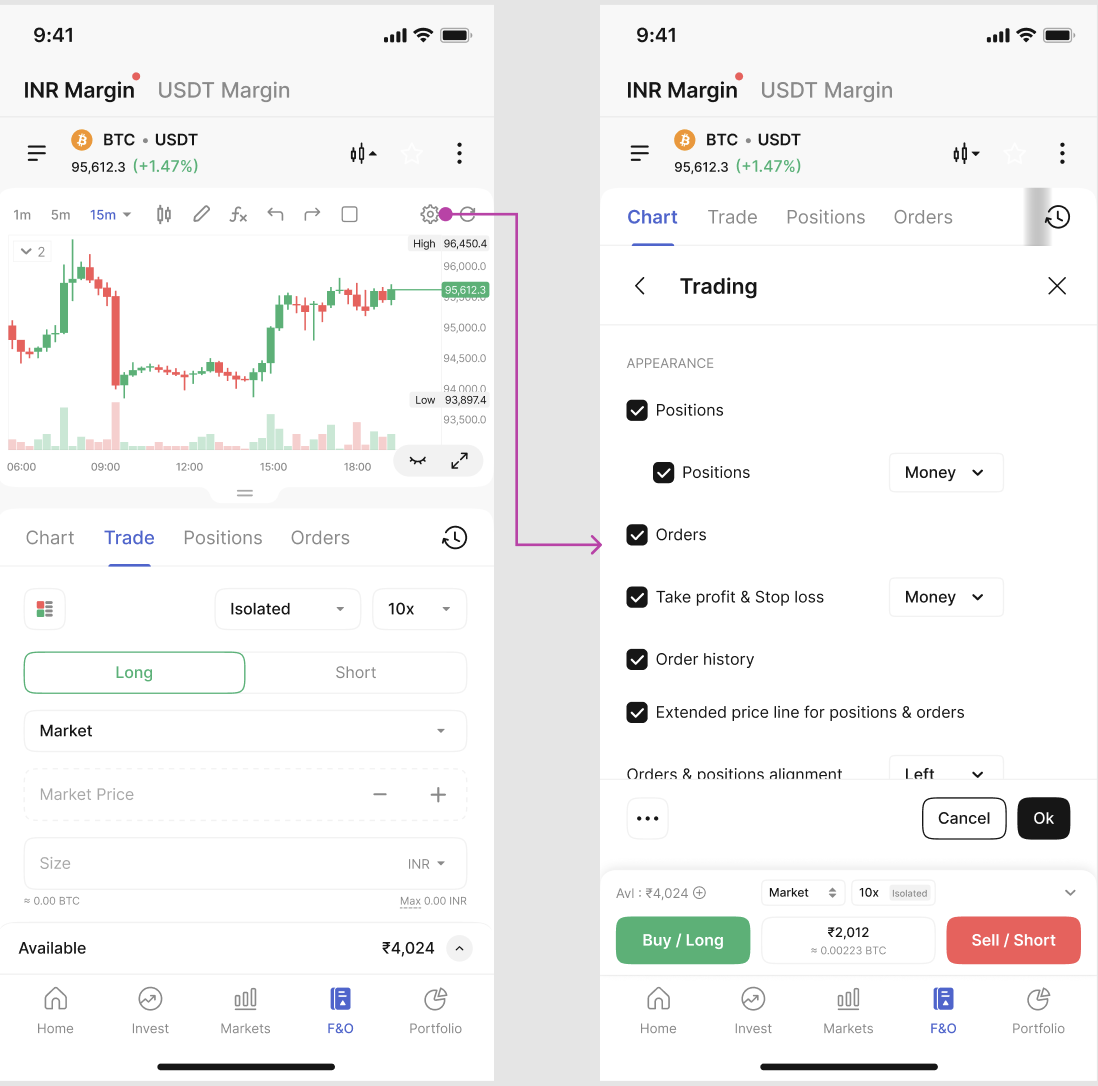
            From Charts Settings (Cog Wheel icon on charts), move to Trading section, where you can enable/disable:

            • Profit/Loss lines
            • Order lines
            • Execution lines
            • Position lines
            • You can also choose whether bars are center- or left-aligned.

            To hide lines temporarily, tap on the ‘eye’ icon. To hide them permanently, adjust the options in Settings.
            Quick Recap

            • Default view → Charts open, Order Form collapsed
            • Chart Trading Mode → order directly on charts
            • Market orders → instant entry + TP/SL lines
            • Limit orders → set buy/sell price with draggable lines
            • TP/SL → add manually or edit directly
            • Settings → control line visibility & alignment

            Conclusion

            Chart Trading makes Futures trading on CoinDCX faster, smarter, and more visual, perfect for traders who want advanced control in volatile markets. Try it now on CoinDCX Futures and experience trading directly from the chart.

            Trade Crypto in INR

            India’s Most Trusted Crypto Exchange

            Install Now!

            Share:
            All Blogs
            Trade Crypto in INR

            India’s Most Trusted Crypto Exchange

            Install Now!

            Recent Articles
            Clarity Act News: Senate Deadlock, Circle Rally, Crypto Regulation Push

            CLARITY Act Advances to Senate Calendar: What’s Next?

            Pi Network Price Prediction 2026: Pi Price in 2026, 2027 – 2030

            Related posts

            How to Save Chart Layouts and Templates on CoinDCX

            How to Save Chart Layouts and Templates on CoinDCX

            Learn how to save chart layouts, indicator templates, and drawing…


            Read more
            1 Jun 2026
              | 6 min read
            SIP: The Simplest Way to Start Investing in Crypto on CoinDCX

            SIP: The Simplest Way to Start Investing in Crypto on CoinDCX

            Many Indians want to invest in crypto but often delay…


            Read more
            27 May 2026
              | 5 min read
            Logo_CoinDCX
            Company
            • About Us
            • Blog
            • Careers
            • Fees
            • Proof of Reserves
            • Partners
            • Bug Bounty
            • Community
            • Policy
            • C.I.P. Fund
            Product
            • Spot Trading
            • Margin Trading
            • Convert
            • Futures Trading
            • Earn
            • VIP
            Support
            • 24/7 Chat Support
            • Support Center
            • Terms of Use
            • Privacy Policy
            • Risk Disclosures
            • Security
            • Terms of Use: Web3 Wallet
            • Media Kit
            Business
            • OTC
            • API Broker
            • Enterprise
            • New Coin Listing
            • Ventures
            • Affiliate
            Buy Cryptos
            • Buy Bitcoin
            • Buy Ethereum
            • Buy Solana
            • Buy Ripple
            • Buy Dogecoin
            • Buy Shiba Inu
            • Buy Pepecoin
            Price Prediction
            • Bitcoin Price Prediction
            • Ethereum Price Prediction
            • Ripple Price Prediction
            • Dogecoin Price Prediction
            • Solana Price Prediction
            • Litecoin Price Prediction
            • All Price Predictions
            Contact Us

            Press Enquiries write to [email protected]
            Regulatory Issues/Enforcement Authorities: [email protected]
            For Grievance Redressal, Click here to know more.

            Disclaimer

            Crypto products & NFTs are unregulated and can be highly risky. There may be no regulatory recourse for any loss from such transactions. The information and material contained herein are subject to change without prior notice including prices which may fluctuate based on market demand and supply. The material available on the site is proprietary to CoinDCX, its parent, Licensor and/or its affiliates and is for informational purposes and informed investors only. This material is not: (i) an offer, or solicitation of an offer, to invest in, or to buy or sell, any interests or shares, or to participate in any investment or trading strategy, or (ii) intended to provide accounting, legal, or tax advice, or investment recommendations.

            *Internal CoinDCX Data as on 6th May 2025
            *Quarterly trading volume for Q4 FY’24-25. Currency conversion rate applied as in data capturing period
            *FIU Registered entity, NEBLIO TECHNOLOGIES PVT LTD
            *Certified in India for May 2023-24

            © 2024 All rights reserved

            Visit CoinDCX
                      No results See all results
                        Download App